
Now Reading: How to Create a Classic FM E-Piano Sound on the Yamaha DX reface
-
01
How to Create a Classic FM E-Piano Sound on the Yamaha DX reface
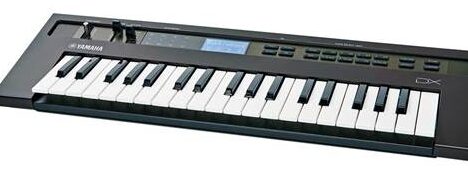
How to Create a Classic FM E-Piano Sound on the Yamaha DX reface
The electric piano sound is one of the most iconic results of FM synthesis. From smooth ballads to funk, soul, jazz, and 80s pop, the glassy yet warm FM E-piano remains timeless. The Yamaha DX reface is perfectly suited for this task, offering classic DX-style FM synthesis with a modern, hands-on interface.
This guide shows how to program a convincing FM electric piano from scratch.
1. Choose the Right Algorithm
An FM electric piano relies on simple but musical operator relationships.
- Choose an algorithm with:
- Two or more carriers
- One or two modulators per carrier
- Parallel carriers work well for stereo width and clarity
You want a structure that allows:
- A clean fundamental tone
- A brighter, metallic attack layered on top
2. Set Operator Ratios (The Core of the Sound)
Operator ratios define the harmonic character.
- Carrier operators:
- Ratio: 1.00 (fundamental)
- Modulator operators:
- Ratio: 2.00 or 3.00 for brightness
- Optional higher ratio (4.00–6.00) for bell-like attack
Lower ratios = warm and woody
Higher ratios = glassy and percussive
3. Shape the Attack with Operator Levels
The classic FM E-piano has a bright initial hit followed by a softer sustain.
- Modulator level:
- Higher at note start
- Drops quickly after the attack
- Carrier level:
- Stable and consistent
This contrast between attack and sustain is what makes the sound feel “played” rather than static.
4. Program the Envelopes (Very Important)
Each operator should have its own envelope behavior.
For modulators (attack character):
- Attack: Fast
- Decay: Short
- Sustain: Low
- Release: Short
For carriers (body of the sound):
- Attack: Fast
- Decay: Medium
- Sustain: Medium to high
- Release: Medium
This gives you a sharp, expressive attack with a smooth, playable tail.
5. Add Velocity Sensitivity
Velocity is essential for realism.
- Increase velocity sensitivity on:
- Modulator levels (more bite when played harder)
- Slightly on carrier output
- Soft playing = warm and mellow
- Hard playing = bright and percussive
Without velocity, an FM E-piano will sound lifeless.
6. Use Feedback Carefully
Feedback adds harmonic complexity.
- Apply feedback to a modulator
- Keep it low to moderate
- Too much feedback turns the sound metallic and harsh
Used subtly, feedback adds character and presence.
7. Apply Effects (Classic DX Style)
The DX reface effects section completes the sound.
- Chorus:
- Slow rate
- Medium depth
- Adds width and movement
- Reverb:
- Small hall or plate
- Keep it light and clean
- Drive:
- Very subtle, if used at all
The goal is smoothness, not grit.
8. Fine-Tuning Tips
- Detune carriers very slightly for thickness
- Keep the sound clean—FM E-pianos shine when uncluttered
- Avoid long releases if you’re playing fast chord work
- Use moderate polyphony to prevent muddiness
Final Thoughts
A great FM electric piano sound is all about dynamic contrast: bright attacks, warm sustains, and expressive velocity control. The Yamaha DX reface makes this process intuitive, allowing you to shape classic E-piano tones quickly while still offering deep control.
Once dialed in, this sound sits beautifully in almost any mix—from funk and jazz to synthwave and modern pop.
Cheat Sheet for E-Piano on the Yamaha DX Reface
Yamaha DX reface – FM E-Piano Preset Cheat Sheet
Algorithm
- Algorithm: One with 2 Carriers + 2 Modulators
(Two parallel stacks, each Modulator → Carrier)
- OP2 → OP1
- OP4 → OP3
Operator Settings
OP1 – Carrier (Main Body)
- Ratio: 1.00
- Level: 90
- Feedback: 0
- Velocity Sensitivity: +2
Envelope
- Attack: 0
- Decay: 35
- Sustain: 70
- Release: 40
👉 Warm, stable body of the sound.
OP2 – Modulator (Attack / Brightness)
- Ratio: 2.00
- Level: 65
- Feedback: 10
- Velocity Sensitivity: +5
Envelope
- Attack: 0
- Decay: 25
- Sustain: 0
- Release: 15
👉 Sharp, metallic hit at note start.
OP3 – Carrier (Secondary Body / Width)
- Ratio: 1.00
- Level: 75
- Feedback: 0
- Velocity Sensitivity: +1
Envelope
- Attack: 0
- Decay: 40
- Sustain: 65
- Release: 45
👉 Adds thickness and stereo depth.
OP4 – Modulator (Bell Character)
- Ratio: 3.00
- Level: 55
- Feedback: 5
- Velocity Sensitivity: +4
Envelope
- Attack: 0
- Decay: 30
- Sustain: 0
- Release: 20
👉 Glassy, bell-like overtone.
Global Settings
Pitch & Performance
- Transpose: 0
- Mono/Poly: Poly
- Portamento: Off
- Pitch Mod (LFO): Off or very subtle
Effects (Very Important)
Chorus
- Type: Chorus
- Rate: Slow
- Depth: Medium
- Mix: ~40%
Reverb
- Type: Plate or Hall
- Time: Short–Medium
- Mix: ~20–25%
👉 This is where the sound becomes classic DX.
Playing Tips
- Play velocity-dynamic (soft = warm, hard = bright)
- Best range: C2–C6
- Reduce modulator levels if the sound is too metallic
- Increase OP2 level slightly for more bite in funk or pop
Quick Variations
More Rhodes-like
- OP2 Level → 55
- OP4 Ratio → 2.00
More DX7 “E-Piano 1”
- OP2 Level → 70
- OP4 Level → 60
- Chorus Mix → 50%
More Bell / Ambient
- OP4 Ratio → 4.00
- Longer release on OP3
Final Tip
If it sounds too harsh:
👉 Lower modulator levels, not carrier levels.
If it sounds dull:
👉 Increase velocity sensitivity on modulators.
This preset will get you very close to classic DX E-Pianos used in 80s pop, funk, jazz, and early house.